> ## Documentation Index
> Fetch the complete documentation index at: https://docs.videoaiditor.com/llms.txt
> Use this file to discover all available pages before exploring further.
# How to use
> How to use the VideoAiditor
## How to Create and Edit a Video Using VideoAiditor
Follow these steps to upload assets, create a video, and use the API to manage and share video edits using VideoAiditor.
### Step 1: Edit a Video in the Editor
1. Go to [https://editor.videoaiditor.com](https://editor.videoaiditor.com).
2. Start by uploading your assets (e.g., images, videos, audio).
3. Edit your video using the available tools in the editor.
**Note:** These uploads are client-side only — no data is actually sent to the server.
### Step 2: Export the Video
Once you've created your video, go to the **Export** tab.
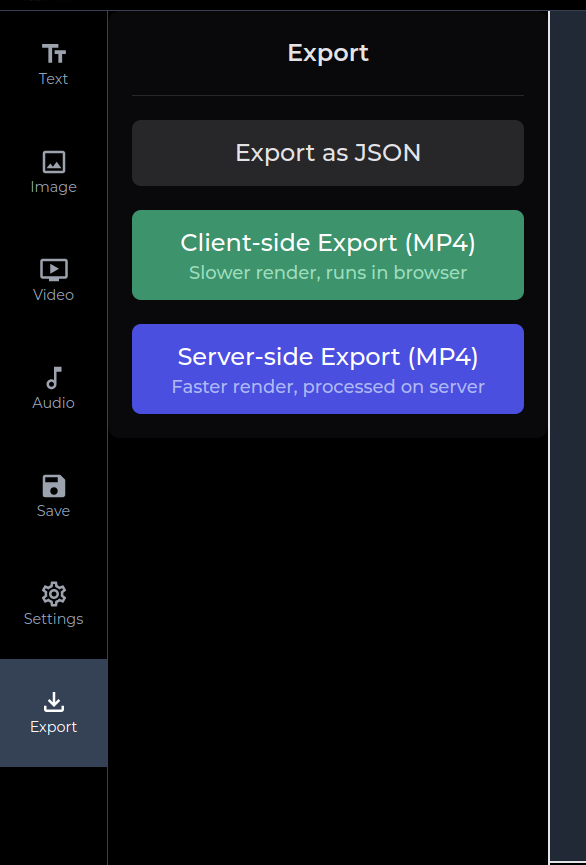 You have two options for exporting:
* **MP4:** Choose this option if you want to download the video as an MP4 file.
* **JSON:** If you want to use the video as a template for your AI platform, export the video as a JSON file.
## Replace Asset URLs in the JSON
If you've chosen to export as JSON, you will need to modify the file before sending it to the API:
* Open the exported JSON file.
* Replace the source URLs of the assets with valid, publicly accessible URLs (e.g., links to images or video files).
* Ensure that the URLs are publicly accessible; otherwise, the video may not load correctly.
## Step 3: Use the API to Create the Video
Send your edited video JSON and get the link for further editing, use the following API endpoint:
Add your API key to the request header as follows:
* `x-api-key: YOUR_API_KEY`
Send a `POST` request to `https://api.videoaiditor.com/v1/videos` with the JSON body and the appropriate headers.
### Request Body Example
```json theme={null}
{
"version": "",
"metadata": {
"name": "",
"backgroundColor": "",
"duration": 123,
"fps": 123,
"canvas": {
"width": 123,
"height": 123
}
},
"clips": [
{
"id": "",
"type": "",
"name": "",
"source": "",
"timeFrame": {
"start": 123,
"end": 123
},
"position": {
"x": 123,
"y": 123,
"z": 123
},
"transform": {
"scale": {
"x": 123,
"y": 123
},
"rotation": 123
},
"size": {
"width": 123,
"height": 123
},
"effects": {
"opacity": 0.5
},
"textProperties": {
"content": "",
"fontSize": 123,
"fontWeight": 123,
"fontFamily": "",
"color": "",
"backgroundColor": "",
"textAlign": "",
"fontStyle": "",
"lineHeight": 123,
"underline": true
}
}
],
"additional": {}
}
```
## Step 4: Handle the Response
Once you send the request, the API will return a response that includes data in the following format:
```json theme={null}
{
"data": {
"metadata": {
"redirectUrl": "https://videoaiditor.com/editor/{unique-id}",
...
}
...
...
}
}
```
### Important: Save the `redirectUrl`
The response will contain a `redirectUrl` field in the metadata. **Save this URL** — it's a special link that will allow you to continue editing the video.
* The URL is **public** but only accessible to users who have the link.
* You can share this URL with others to allow them to edit the video. Since it's a presigned URL, no one else will be able to access it without the exact link.
## Final Notes
* **Security:** Be cautious when sharing the `redirectUrl` since it provides direct access to that video in video editor.
* **Public Access:** Ensure the asset URLs you provide in the JSON are publicly accessible. If they are private or restricted, the video may not load correctly when editing.
* **API Key:** Keep your API key secure. Do not share it in public forums or expose it in client-side code.
You have two options for exporting:
* **MP4:** Choose this option if you want to download the video as an MP4 file.
* **JSON:** If you want to use the video as a template for your AI platform, export the video as a JSON file.
## Replace Asset URLs in the JSON
If you've chosen to export as JSON, you will need to modify the file before sending it to the API:
* Open the exported JSON file.
* Replace the source URLs of the assets with valid, publicly accessible URLs (e.g., links to images or video files).
* Ensure that the URLs are publicly accessible; otherwise, the video may not load correctly.
## Step 3: Use the API to Create the Video
Send your edited video JSON and get the link for further editing, use the following API endpoint:
Add your API key to the request header as follows:
* `x-api-key: YOUR_API_KEY`
Send a `POST` request to `https://api.videoaiditor.com/v1/videos` with the JSON body and the appropriate headers.
### Request Body Example
```json theme={null}
{
"version": "",
"metadata": {
"name": "",
"backgroundColor": "",
"duration": 123,
"fps": 123,
"canvas": {
"width": 123,
"height": 123
}
},
"clips": [
{
"id": "",
"type": "",
"name": "",
"source": "",
"timeFrame": {
"start": 123,
"end": 123
},
"position": {
"x": 123,
"y": 123,
"z": 123
},
"transform": {
"scale": {
"x": 123,
"y": 123
},
"rotation": 123
},
"size": {
"width": 123,
"height": 123
},
"effects": {
"opacity": 0.5
},
"textProperties": {
"content": "",
"fontSize": 123,
"fontWeight": 123,
"fontFamily": "",
"color": "",
"backgroundColor": "",
"textAlign": "",
"fontStyle": "",
"lineHeight": 123,
"underline": true
}
}
],
"additional": {}
}
```
## Step 4: Handle the Response
Once you send the request, the API will return a response that includes data in the following format:
```json theme={null}
{
"data": {
"metadata": {
"redirectUrl": "https://videoaiditor.com/editor/{unique-id}",
...
}
...
...
}
}
```
### Important: Save the `redirectUrl`
The response will contain a `redirectUrl` field in the metadata. **Save this URL** — it's a special link that will allow you to continue editing the video.
* The URL is **public** but only accessible to users who have the link.
* You can share this URL with others to allow them to edit the video. Since it's a presigned URL, no one else will be able to access it without the exact link.
## Final Notes
* **Security:** Be cautious when sharing the `redirectUrl` since it provides direct access to that video in video editor.
* **Public Access:** Ensure the asset URLs you provide in the JSON are publicly accessible. If they are private or restricted, the video may not load correctly when editing.
* **API Key:** Keep your API key secure. Do not share it in public forums or expose it in client-side code.